

Disney continues to add features that tie Hulu and Disney+ together, with the goal of “fully integrating” Hulu into the Disney+ service.
The Mouse House has outlined plans to offer a “unified” app experience to Disney+ and Hulu bundle subscribers in 2026, with the company moving toward a future where both are integrated into the same backend technology platform. But for now, Hulu’s standalone subscription in the U.S. remains available, and “there are no current plans to discontinue the Hulu app,” a Disney representative said.
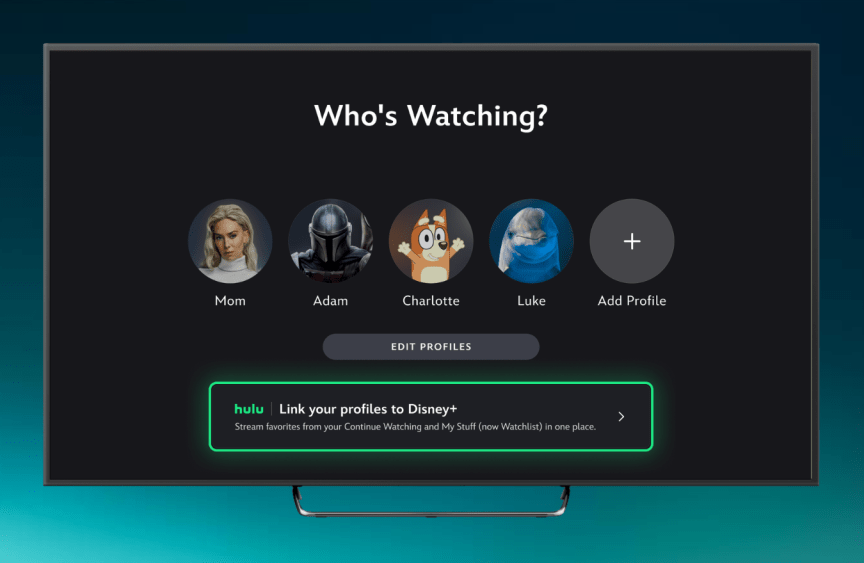
Starting Tuesday (May 19), Disney+ and Hulu bundle customers will be able to sync their profiles, including viewing history, watchlists, and recommendations, from Hulu to the Disney+ app. Once your Hulu profile is linked to Disney+, viewers will be able to pick up where they left off and stream content from both services from the Disney+ app.
Current Hulu + Live TV plan subscribers. Disney+, Hulu, Max bundle. Or, the Hulu add-on can’t link your profile to Disney+. Additionally, Hulu children’s profiles and profiles for those under 18 will not be linked to Disney+.
In addition, eligible Hulu-only subscribers will be able to sign in to Disney+ using their Hulu login credentials and will be able to stream Hulu content along with a “small sample” of Disney+ and ESPN content on Disney+ “to give you a taste of what is available to bundled subscribers,” the company said. In other words, Disney wants to get you to level up and buy a bundle of two services.
The latest integration builds on Disney’s previous steps to integrate Hulu and Disney+. In spring 2024, the full functionality of Hulu on-demand content was added to the Disney+ app (Hulu + Live TV remains separate).
According to Disney, users only need to link their Hulu profile to Disney+ once. Your viewing history and recommendations will then be reflected directly in the Disney+ app. Titles you watch on Hulu will appear in the “Continue Watching” section on Disney+, and titles you save in “My Stuff” on Hulu will appear in the “Watchlist” section on Disney+.
Users with linked profiles will see personalized viewing history and recommendations, including Hulu content, on the For You tab on the Disney+ home screen. Additionally, Hulu has its own dedicated hub on Disney+.
Additional Hulu features, such as access to live TV channels and add-on programming packages, will continue to be available in the Hulu app and will be added to Disney+ in the future.
The company says Disney+ will soon begin testing a new “Live Guide” for subscribers to find content currently streaming live. This includes streams of ABC News Live and Disney+ Playtime for all Disney+ users, and the ESPN network for ESPN Unlimited subscribers.
To sync your Hulu profile with Disney+, you must first sign in to Disney+ using the same login information you use for Hulu. You can choose to create a new Disney+ profile based on your Hulu profile or link it to your current Disney+ profile. (If you have the bundle, you should see the Hulu banner above on the “Who’s Watching?” screen and click the “Link your profile to Disney+” option.) You can then personalize your profile by choosing from a collection of Hulu avatars and a selection of Disney+ favorites. The final step is to check and confirm your profile’s content rating level.
